
Account, billing and settings reference
This page is the reference for how UserSearch meters and charges usage, and how you manage your account. It covers the Credits currency and its top-up controls, Transaction history, your Subscription and payment details, and the security actions in Settings — including two-factor authentication and account deletion.
Two surfaces are documented here:
- the Account Credits & Team Licenses page, which hosts the Top-up controls, third-party service list, subscription table and transaction log; and
- the Settings area, split into an Account tab (security, delete account) and a Billing tab (subscription).
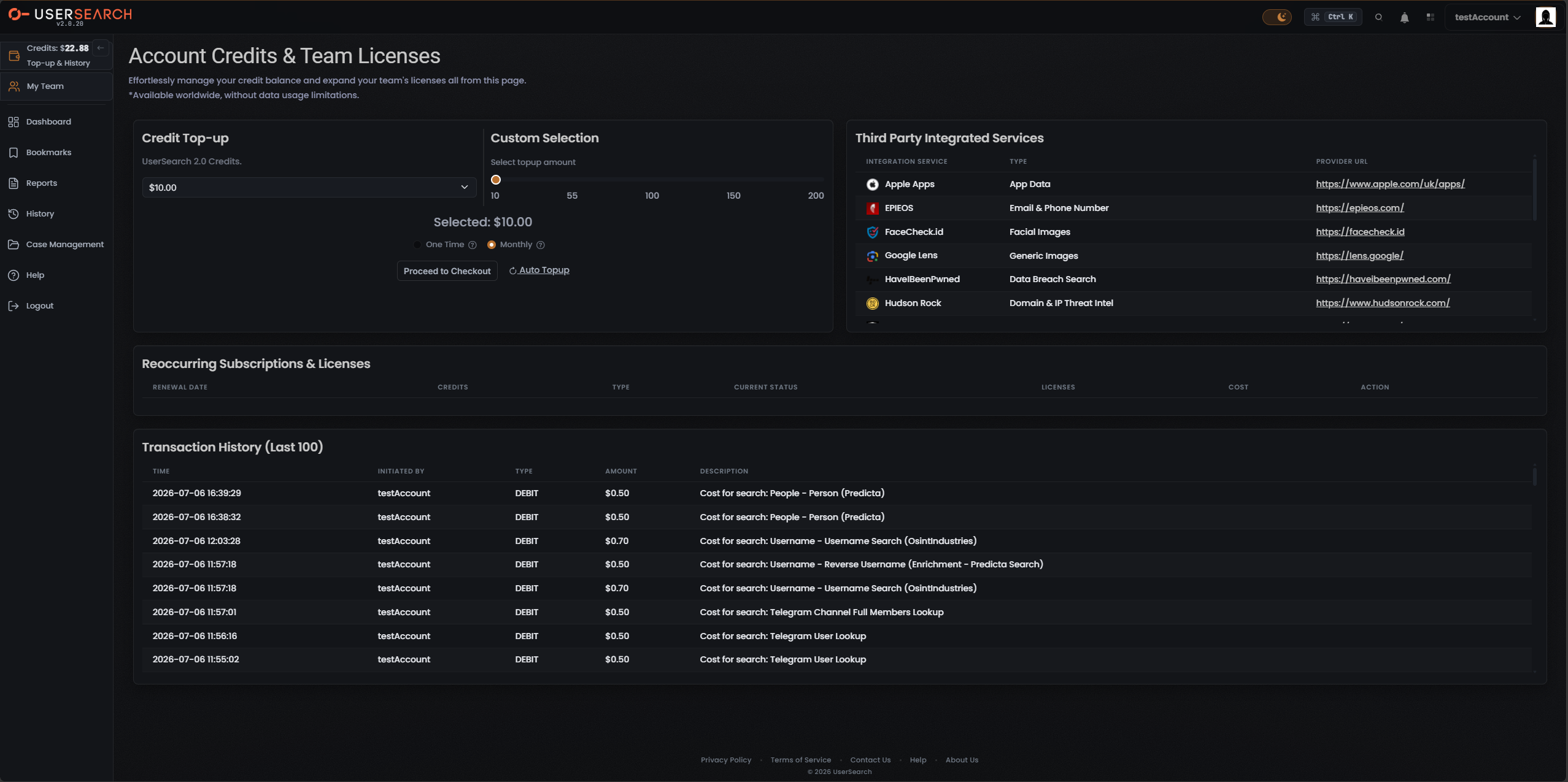
Credits
Section titled “Credits”Credits are UserSearch’s prepaid usage currency. Every search costs zero or more Credits, deducted from a running balance shown in the top bar and topped up on the Account Credits & Team Licenses page.
The balance is displayed with a currency symbol (for example, Credits: $22.88) rather than an abstract point count, and it carries the sub-label Top-up & History. Searches in the transaction log are charged in the same dollar amounts.
Two separate credit pools
Section titled “Two separate credit pools”There are two independent credit pools, topped up and spent independently (per Lee, 2026-07-08):
- the main Global search-credits pool — the balance shown in the top bar, labelled UserSearch 2.0 Credits in the top-up panel; and
- the S.A.R.G.E. pool for the AI Agent feature.
Ordinary searches draw down the Global pool; S.A.R.G.E. usage draws down its own pool.
What a search costs
Section titled “What a search costs”Per-search pricing falls into three cost types:
| Cost type | Amount | Example |
|---|---|---|
| Free | 0 Credits | — |
| Fixed | A set amount | Search type and Module searches such as Vehicle are fixed price (per Lee, 2026-07-08) |
| Dynamic | A variable amount shown as a range | A OneScan search costs the sum of all data sources left selected in the Choose Data Source modal, so its range (for example, $0.50–1.20) moves as data sources are toggled on or off (per Lee, 2026-07-08) |
Every entry in Transaction history is a search charge, confirming that running a search deducts Credits by the listed amount.
Account Credits & Team Licenses page
Section titled “Account Credits & Team Licenses page”The page is titled Account Credits & Team Licenses, subtitled “Effortlessly manage your credit balance and expand your team’s licenses all from this page.”
Top-up
Section titled “Top-up”Two coordinated controls set the top-up amount for the Global (“UserSearch 2.0 Credits”) pool.
- Credit Top-up panel — a dropdown that currently shows $10.00 and opens a list of preset top-up amounts.
- Custom Selection panel — a slider labelled Select topup amount with tick labels 10, 55, 100, 150, 200 and a live readout (Selected: $10.00).
The Custom Selection panel offers two mutually exclusive options, each with a help (?) icon:
- One Time — a single purchase.
- Monthly — a recurring amount.
Proceed to Checkout advances to a payment flow, and an Auto Topup control toggles automatic recurring top-up when your balance runs low.
Third Party Integrated Services
Section titled “Third Party Integrated Services”A panel titled Third Party Integrated Services lists the external data sources used by Modules, with columns INTEGRATION SERVICE, TYPE and PROVIDER URL. These are the same entities called data sources elsewhere in the product, shown here in a billing context.
Visible rows:
| Integration service | Type | data source URL |
|---|---|---|
| Apple Apps | App Data | https://www.apple.com/uk/apps/ |
| EPIEOS | Email & Phone Number | https://epieos.com/ |
| FaceCheck.id | Facial Images | https://facecheck.id |
| Google Lens | Generic Images | https://lens.google/ |
| HaveIBeenPwned | Data Breach Search | https://haveibeenpwned.com/ |
| Hudson Rock | Domain & IP Threat Intel | https://www.hudsonrock.com/ |
Reoccurring Subscriptions & Licenses
Section titled “Reoccurring Subscriptions & Licenses”A section titled Reoccurring Subscriptions & Licenses, with columns RENEWAL DATE, CREDITS, TYPE, CURRENT STATUS, LICENSES, COST and ACTION. In the captured account it has no data rows.
Transaction history
Section titled “Transaction history”A section titled Transaction History (Last 100) is the billing log of charges and purchases, with columns TIME, INITIATED BY, TYPE, AMOUNT and DESCRIPTION.
Captured rows — all DEBIT search charges:
| Time | Type | Amount | Description |
|---|---|---|---|
| 2026-07-06 16:39:29 | DEBIT | $0.50 | Cost for search: People - Person (Predicta) |
| 2026-07-06 16:38:32 | DEBIT | $0.50 | Cost for search: People - Person (Predicta) |
| 2026-07-06 12:03:28 | DEBIT | $0.70 | Cost for search: Username - Username Search (OsintIndustries) |
| 2026-07-06 11:57:18 | DEBIT | $0.50 | Cost for search: Username - Reverse Username (Enrichment - Predicta Search) |
| 2026-07-06 11:57:18 | DEBIT | $0.70 | Cost for search: Username - Username Search (OsintIndustries) |
| 2026-07-06 11:57:01 | DEBIT | $0.50 | Cost for search: Telegram Channel Full Members Lookup |
| 2026-07-06 11:56:16 | DEBIT | $0.50 | Cost for search: Telegram User Lookup |
| 2026-07-06 11:55:02 | DEBIT | $0.50 | Cost for search: Telegram User Lookup |
The log is described as capped to the 100 most recent entries.
Settings
Section titled “Settings”The Settings area manages your account details, security and subscription. It is reached under a Dashboard › Settings breadcrumb and is titled Settings, subtitled “Manage your account settings and preferences.” A vertical sub-nav offers two single-select tabs — Account and Billing — with the active tab shown as a coral-orange pill. The left nav and top bar remain visible around it.
Account tab
Section titled “Account tab”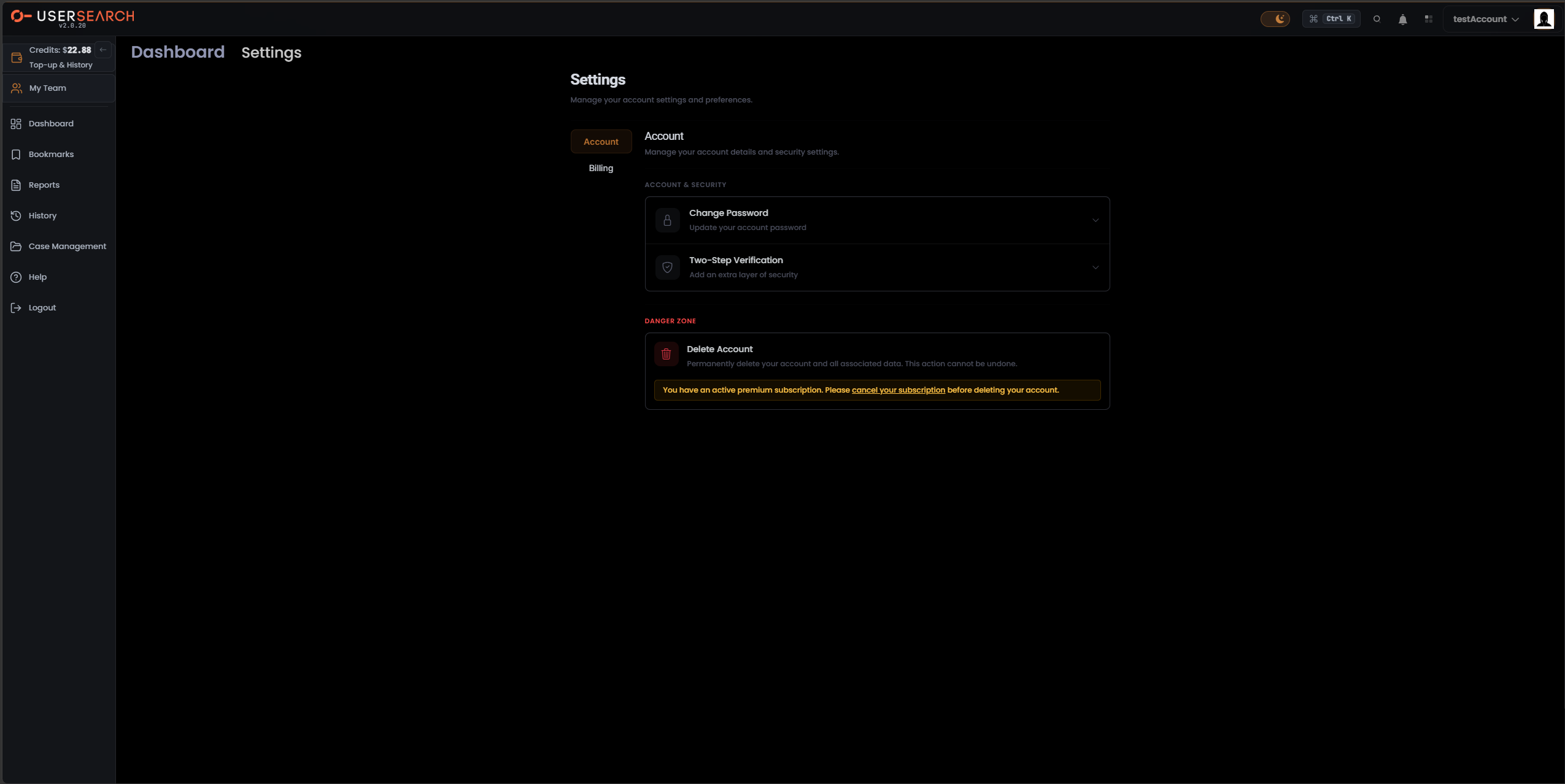
The Account tab is titled Account, subtitled “Manage your account details and security settings.”
ACCOUNT & SECURITY has two expandable rows:
| Row | Helper text | Behaviour |
|---|---|---|
| Change Password | ”Update your account password” | Expands in place to a password-change form. |
| Two-Step Verification | ”Add an extra layer of security” | Expands in place to 2FA setup controls. |
Two-Step Verification is the product’s 2FA feature — a second authentication factor required at login in addition to your password.
Danger Zone
Section titled “Danger Zone”A DANGER ZONE section, rendered in red, contains a single destructive action.
- Delete Account — “Permanently delete your account and all associated data. This action cannot be undone.”
In the captured state a warning banner reads “You have an active premium subscription. Please cancel your subscription before deleting your account.”, with cancel your subscription as a link to the Billing cancellation flow.
Account deletion is gated: while an active Premium Membership exists, the delete action is blocked until the subscription is cancelled first.
Billing tab
Section titled “Billing tab”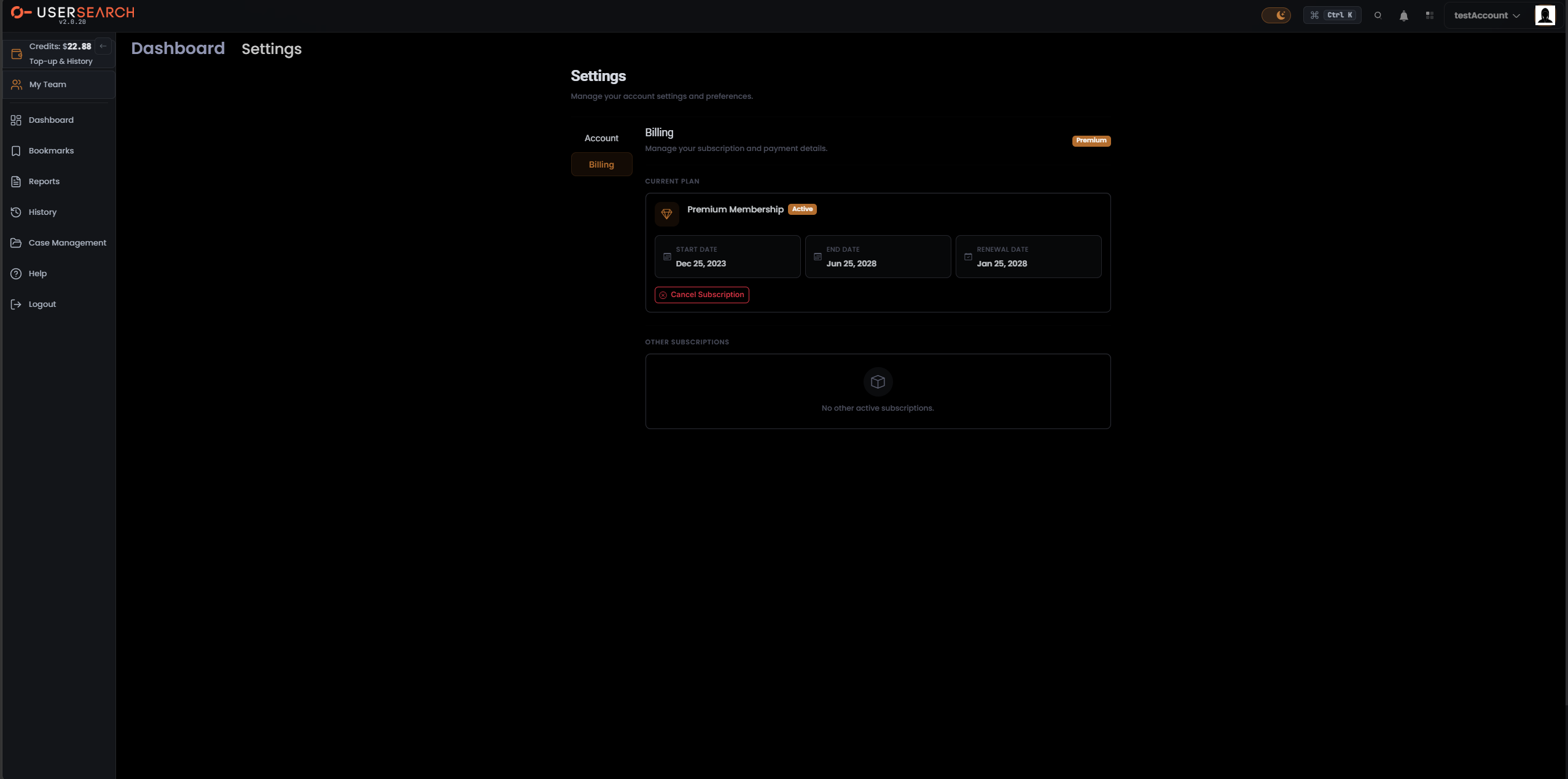
The Billing tab is titled Billing, subtitled “Manage your subscription and payment details.”, with a coral-orange Premium badge at the top-right.
Current Plan
Section titled “Current Plan”The CURRENT PLAN section contains a card titled Premium Membership with a green Active badge and three dated fields:
| Field | Value (captured) |
|---|---|
| START DATE | Dec 25, 2023 |
| END DATE | Jun 25, 2028 |
| RENEWAL DATE | Jan 25, 2028 |
A red-outlined Cancel Subscription button sits below the dates and starts the cancellation flow. This is the same action the Account tab’s “cancel your subscription” link points to, and it is the prerequisite for unlocking Delete Account.
Other Subscriptions
Section titled “Other Subscriptions”The OTHER SUBSCRIPTIONS section shows an empty-state card reading No other active subscriptions. Additional or add-on subscriptions would list here when they exist.
How subscription, credits and teams relate
Section titled “How subscription, credits and teams relate”- Subscription and Credits are distinct. The Premium Membership managed in Settings › Billing is a recurring Subscription. It is separate from Credits (the prepaid usage currency) and from Top-up / Auto-topup.
- Two credit pools exist — the Global search-credits pool and the S.A.R.G.E. pool — topped up and spent independently (per Lee, 2026-07-08). Neither is the same as the Premium Membership subscription.
- Team accounts share one common pool of Credits and can share Cases, all controlled by a team leader (per Lee, 2026-07-08). Single accounts do not share; Cases and Credits belong to the one user.
Verified against UserSearch v2.0.20