
Website forensics search: overview
The Website Forensics search type lets you investigate a domain — its current and historical ownership, how its pages changed over time, third-party lookups, and favicon matching. Pick it from the search composer when your starting identifier is a domain name (or, for one Module, an email address) rather than a username, phone number, wallet address, or other identifier.
When to use it
Section titled “When to use it”Use the Website Forensics search type when you have a domain (or an email to reverse-look-up) and want to:
- Retrieve a domain’s current and historical ownership — registration data, registration history, and associated contacts (via the Website Domain Ownership (by Domain) Module).
- Find the domains registered under a given email address — a reverse-WHOIS pivot (via the Website Domain Ownership (by Email) Module).
- Review how a site’s pages changed over time through archived snapshots (via the Website Change History Module).
- Run a third-party website lookup, or match a site by its favicon (via the 3rd Party Website Lookup and Search by Favicon Modules).
This search type exposes five Modules, all single-purpose. For the full breakdown of each Module, its input, cost, and data source, see Website forensics modules & options.
The end-to-end flow
Section titled “The end-to-end flow”The Website Forensics search type follows the same search composer flow as every other search in UserSearch — see How UserSearch works for the general model.
- In the composer header, open the Search type selector and choose Website Forensics.
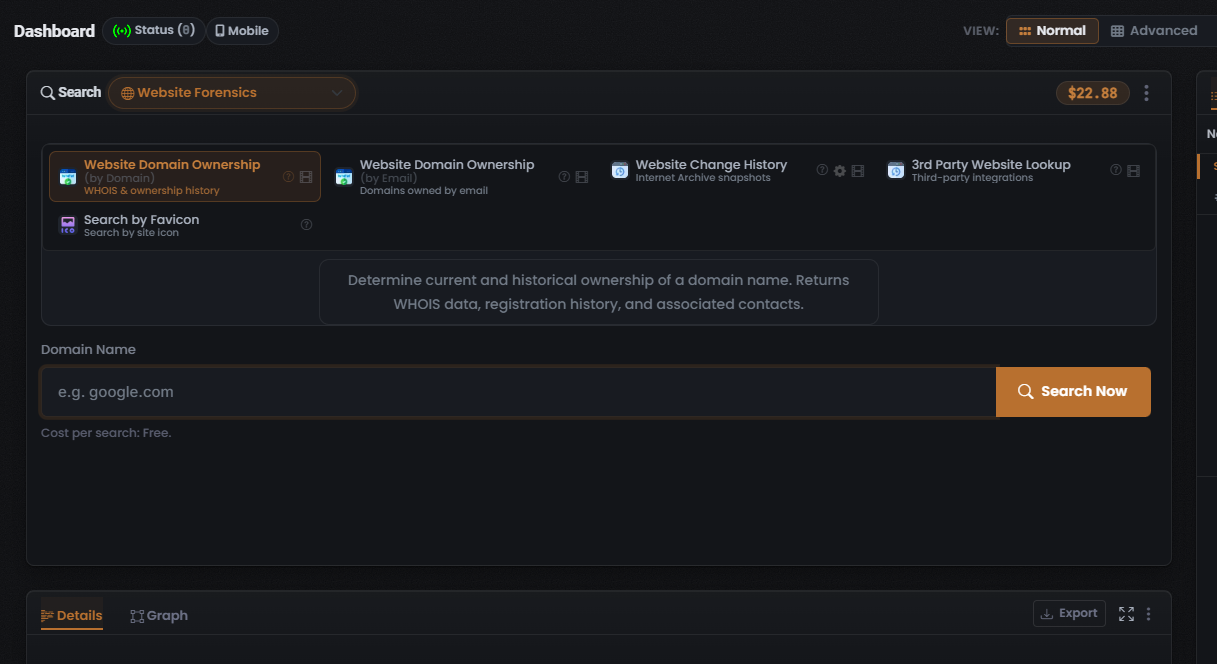
- Pick a Module from the grid — Website Domain Ownership (by Domain) (selected by default), Website Domain Ownership (by Email), Website Change History, 3rd Party Website Lookup, or Search by Favicon. The Module grid is single-select: selecting one deselects the rest. The selected tile is drawn with a coral-orange highlighted border, and it loads its description, its Cost per search value, and its query form below.
- Enter your identifier. For the default Module this is a Domain Name; the Website Domain Ownership (by Email) Module instead takes an email address and returns the domains registered under it (reverse-WHOIS).
- Confirm the Cost per search line beneath the input before you run. With Website Domain Ownership (by Domain) selected it reads “Cost per search: Free” — the Module consumes no Credits per search.
- Select Search Now (the coral-orange button with a magnifier icon at the right of the input row) to run the query.
What you get back
Section titled “What you get back”Selecting Website Domain Ownership (by Domain) and running a search returns, per its Module description, the domain’s current and historical ownership — WHOIS registration data, registration history, and associated contacts. Results populate the Search Results panel on the right, which carries the standard Found / Enriched / Connections counters and Details / Graph tabs.
The two Domain Ownership Modules are attributed to a WHOIS data source, and Website Change History to the Internet Archive — but both attributions are inferred from the Module names, not confirmed on screen. See Website forensics modules & options for the per-Module data-source detail and cautions.
For how to read and verify those results — the counters, the results table columns, and the Details panel — see Reading Website forensics results.
Verified against UserSearch v2.0.20