
Username modules & options
The Username Intelligence search type exposes nine Modules in the captured build. Each Module is a card in the grid that runs one search against a specific data source — the external third party that holds the data — or, for OneScan, across several data sources at once. Selection is single-select: the active tile carries a coral-orange border and title.
For the composer flow that surrounds these Modules, see Username search: overview; for reading what comes back, see Reading Username results.
The nine Modules
Section titled “The nine Modules”| Module (as shown on the tile) | data source | What it returns | Cost | Integration |
|---|---|---|---|---|
| Username Search (3000+ sites) (selected by default) | UserSearch (own 3000+ site index) | Reverse-username sweep across 3000+ sites with profile enrichment | Free | — |
| Username Search (OneScan) · RECOMMENDED | Multiple (OneScan — Predicta + OsintIndustries observed) | One username run across several data sources at once, merged for comparison | Dynamic — “$1.20 | Dynamic (0.50 - 1.20)“ | — |
| Username Search (Data: OsintIndustries) | OSINT Industries | Single-source username search over OSINT Industries data | $0.70 (fixed) | OSINT Industries |
| Username Search (Data: Predicta) | Predicta | Single-source username search over Predicta data | $0.50 (fixed) | Predicta |
| Username Search (Data: Pipl - Social) | Pipl (Social) | Single-source username search over Pipl social data | Not captured | Pipl |
| GitHub Search (Data: Github) | GitHub | GitHub repositories and activity for a username | Not captured | GitHub |
| Twitter History (Data: InternetArchive) | Internet Archive | Historical Twitter data for a username, via the Internet Archive | Not captured | Internet Archive |
| Twitter Posts (Data: InternetArchive) | Internet Archive | Archived Twitter posts for a username, via the Internet Archive | Not captured | Internet Archive |
| Username Search (Data: Pipl - Business) | Pipl (Business) | Single-source username search over Pipl business data | Not captured | Pipl |
The lead Module: Username Search (3000+ sites)
Section titled “The lead Module: Username Search (3000+ sites)”Username Search (3000+ sites) is pre-selected when you open the search type. Its description reads: “Reverse Username search across 3000+ websites with profile enrichment of results. Discovers social media, forums, and other accounts linked to a username.” Its Cost per search is Free, and its query field is labelled Search query.
The single-source Modules
Section titled “The single-source Modules”Seven Modules query one named data source directly. Pick these when you want a specific source rather than the broad sweep or the merged OneScan run:
- OSINT Industries ($0.70) and Predicta ($0.50) — username lookups over each vendor’s data. These are the same two data sources OneScan aggregates.
- Pipl (Social) and Pipl (Business) — username lookups over Pipl’s social and business datasets. See Pipl.
- GitHub Search — repositories and activity for a handle on GitHub.
- Twitter History and Twitter Posts — historical and archived Twitter data for a handle, served from the Internet Archive.
OneScan — the multi-source Module
Section titled “OneScan — the multi-source Module”Username Search (OneScan) is badged RECOMMENDED. Its description reads: “Run a single username search across multiple data sources simultaneously, then compare results side by side for comprehensive coverage.” A single OneScan search fans one handle out across several data sources and merges the results, so the results table attributes each row to the data source that returned it.
OneScan’s cost is dynamic — the charge is the sum of the data sources left toggled on in its Choose Data Source modal (per Lee, 2026-07-08). In the captured state the ceiling ($1.20) is Predicta ($0.50) plus OsintIndustries ($0.70) with both enabled; the floor ($0.50) is the cheapest single data source left on. See OneScan explained.
Choose Data Source
Section titled “Choose Data Source”Some Modules carry a gear icon that opens a Choose Data Source modal. It takes one of two forms depending on the Module.
Narrowing the site sweep (Username Search 3000+ sites)
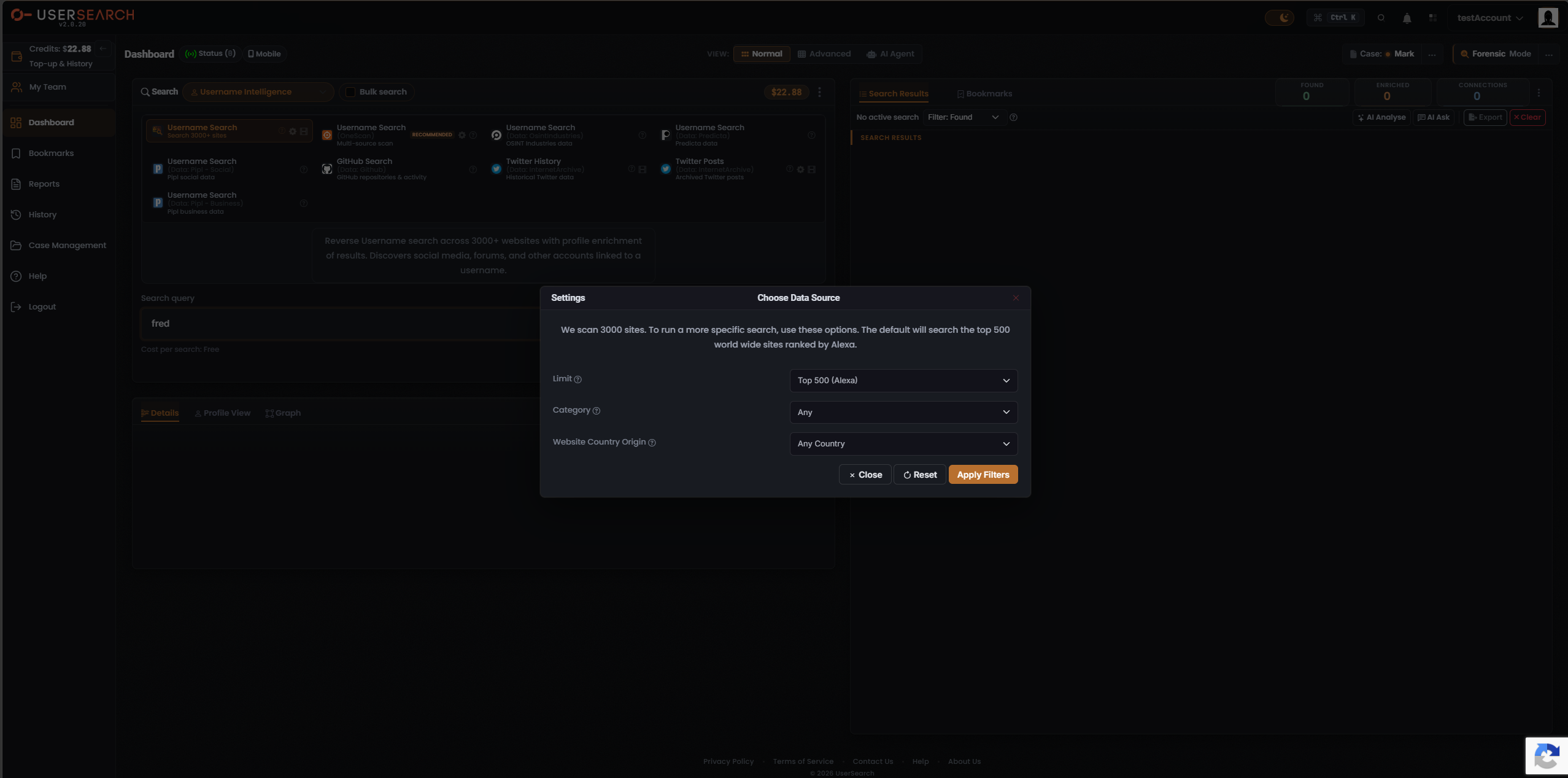
Section titled “Narrowing the site sweep (Username Search 3000+ sites)”For the site-scanning Module, the modal narrows which sites are searched. Its intro reads: “We scan 3000 sites. To run a more specific search, use these options. The default will search the top 500 world wide sites ranked by Alexa.” The captured controls are:
- Limit — set to Top 500 (Alexa) in the captured state.
- Search type — set to Any.
- Website Country Origin — set to Any Country.
Commit with Apply Filters, restore defaults with Reset, or dismiss without committing via Close or the ×.
Choosing data sources (OneScan)
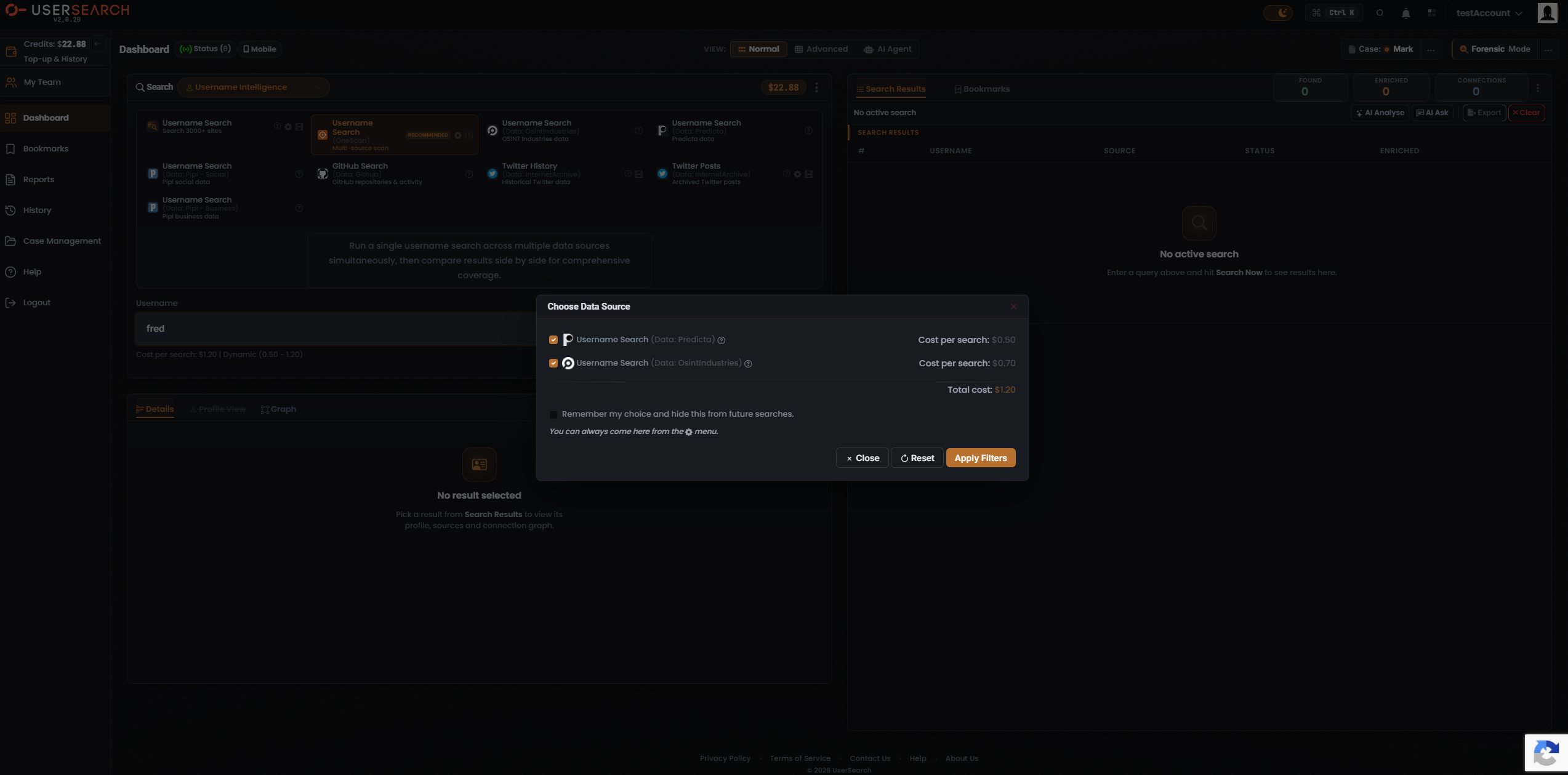
Section titled “Choosing data sources (OneScan)”For OneScan, the modal lists the individual data sources it can query, each with a checkbox and its own per-search cost. In the captured state:
| data source | Cost per search |
|---|---|
| Username Search (Data: Predicta) | $0.50 |
| Username Search (Data: OsintIndustries) | $0.70 |
| Total cost | $1.20 |
The Total cost line sums the enabled data sources. Toggling a data source off removes its cost from the total and narrows which data sources OneScan queries — the lever for trading coverage against spend. A “Remember my choice and hide this from future searches” checkbox persists the selection; its helper text notes you can always return via the gear menu. Commit with Apply Filters.
Per-tile affordances
Section titled “Per-tile affordances”Each Module tile shows a data-source icon, a bold title, a greyed data-source sub-label (as “(Data: …)”), and a short descriptor. Tiles also carry a circular ”?” help icon, and some carry a film-strip (tutorial/video) icon.
Related: Username search: overview · Reading Username results · OneScan · Data sources & reliability
Verified against UserSearch v2.0.20